Follow Add This All

Showing posts with label google play. Show all posts

Saturday, 16 November 2013

Bring Your Apps into the Classroom, with Google Play for Education

Google Play for Education has officially launched. It’s an extension of Google Play that’s designed for schools, simplifying discovery of educational apps and enabling developers and content providers to reach K-12 educators in the U.S. It offers bulk purchasing with purchase orders and instant distribution of educational apps, videos and other educational content to students' Android tablets via the cloud. Google Play for Education helps your apps gain visibility with the right audiences, without having to knock on school doors.
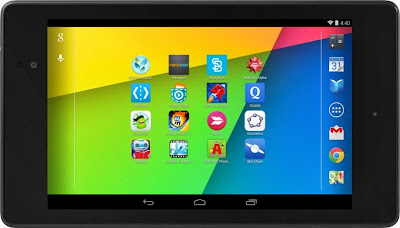
If you've built an Android app that would be awesome for schools—or even have an idea for one—now's the time to jump in. We'll put you one click away from getting purchased and installed by entire school districts. Class Dojo, Explain Everything, Nearpod, andSocrative are already getting discovered in Google Play for Education.

How to join Google Play for Education

If you already have an educational Android app you can use the Google Play Developer Console to mark your apps for inclusion in Google Play for Education. Marking your app identifies it as suitable for the US K-12 educational market and queues it for educator approval. These educators perform a first-pass qualification of apps, assigning the appropriate subject, grade, and common core standards metadata, while evaluating if the app meets the Google Play for Education criteria for classroom use.

Designing great apps for classrooms

High quality apps are top priority for teachers. Whether you already have an existing K-12 educational app or are looking to build one, take a look at our detailed requirements and guidelines—which we have compiled for you based on educator feedback—to ensure your app is appropriate for a K-12 environment. Also ensure that your app is optimized for both 7” and 10” Android tablets. Then, upload your new or updated app through the Developer Console, opt in to Google Play for Education, and publish. We will email you when your app has been evaluated.
For more information, please visit the Google Play for Education pages on the Android developer site. We are excited to be supporting schools to bring the best content and tools to their students. We look forward to seeing your app on Google Play for Education.

Wednesday, 6 November 2013

Google Play Music Thinks Preachers Like Filthy Lyrics

The new Google Play Music app added a cool feature, that is cool in theory. There’s a new “I’m feeling lucky radio” link at the top of the main page. The app intends to help users find some music to stream based on their listening habits. The Music app on iOS offers a similar feature called Genius mixes, which recommends “radio stations” based on music in a user’s library.
The feature sounds great and I hoped it would help me discover some new music. The iOS Genius mixes work well.
When I hit the “I’m feeling lucky radio” link, the results embarrassed me. I was glad that I wasn’t with the people I work with. That’s because Google seems to think this Southern Baptist Preacher loves explicit lyrics. F-bombs at church don’t go over too well, but that’s what I got and in large quantities. The stream plays nothing but rap and hip hop and most of it is explicit.
google play music adds i'm feeling lucky radio
Understand this I’m not judging anyone who likes songs with F-bombs. Have a good time with them, but I’m not one who does. I like Christian rock, classical, jazz and some good old-fashioned 70s and 80s rock-n-roll. That’s what’s in my library and that’s what I listen to often.
This could cause problems for parents who don’t want to expose their kids to this kind of music. Fortunately, we eventually found the setting to block explicit content. Tap the menu button in the upper left and choose Settings. Mark Block explicit songs in radio to stop the feature from offering F-bombs and other adult lyrics.
Over the last month I’ve used the Google Play Music app to find some kids Bible songs for a Saturday kids club we host at church. If Google had its way the B-I-B-L-E would stand for something very different from what I’m trying to express to these 5-10 year old kids.
google play music i'm feeling lucky recommendations failed me
The recommendation engine is seems see that some of the music in our family’s library includes some Christian rap and soul artists like Toby Mac and Newsboys. My son likes Lecrae and uses the app on his Galaxy S3 to listens to him a bit. However, recommending music based on one style of music which makes up only 2 percent of a library means Google has a real fail on its hands. I can see throwing one or two songs like that in by mistake based on the small number of Christian rap songs, but it only plays one kind of music, rap and hip hop with explicit versions more than half the time. I keep hitting the thumbs down button and it keeps feeding me the same kind of songs.
Maybe this is a minority case. A friend seems to get a wide variety of music that fits his library and listening habits. Let us know how well Google did in finding your favorite style of music. Will you use the “I’m feeling lucky radio” feature?

Top 10 Paid Android Apps on Google Play

android


There is an extreme amount of apps on Google Play market, and it can be quite overwhelming. Lately, we’ve been posting about the best “free” apps. In this post we’ll switch it up and let you know which apps are worth paying for.

1. Call of Duty: Strike Team

call of duty strike team android app
Call of Duty: Strike Team is an action game developed by Activision Publishing, Inc. Customize your squad with weapons lead them into combat. Fight off waves of enemies and make your way to the top of the leaderboard. You can download Call of Duty: Strike Team from the Google Play Store here.

2. Swiftkey Keyboard

swiftkey android app
Developed by TouchType Ltd., Swiftkey is able to understand not just patterns in your typing, but also how words work together. Swiftkey can continue to learn from SMS, your email and even social media accounts (if enabled), so it gets better at making predictions as you type. You can purchase Swiftkey from the Google Play Store here.

3. Drift Mania: Street Outlaws

drift mania street outlaws android app
Drift Mania: Street Outlaws is a racing game developed by Ratrod Studio Inc. Customize your vehicle and drift around some of the most hazardous roads. Compete against different opponents and brag about your results on Facebook. You can download Drift Mania: Street Outlaws from the Google Play Store here.

4. PicSay Pro

picsay pro android app
With PicSay Android app, users can get creative by adding word bubbles, clip-art graphics and word art titles. Apply photo-editing basics like contrast, color temperature, and add cool effects. When you’re done editing your photos, share your them with friends on social networking sites. You can purchase PicSay Pro Photo Editor from the Google Play Store here.

5. The Walking Dead: Assault

the walking dead assault android app
The Walking Dead: Assault is a strategy game based on Robert Kirkman’s Eisner award winning comic series “The Walking Dead.” Players control Rick Grimes as he awakens in the hospital where he recovered from his coma. As you walk around the hospital, gather up as many supplies as you can and destroy the walker hordes. Additional booster items will give you more ammo and health. Complete bonus challenges and unlock special content including new artwork and wallpapers for your Android device. You can purchase The Walking Dead: Assault from the Google Play Store here.

6. Nova Launcher Prime

nova launcher prime android app
Nova Launcher Prime is a home screen replacement app for Android developed by TeslaCoil Software. Use swiping gestures to start Nova Actions and clean up the clutter by hiding apps you never use. Unread counts show in dock, desktop, drawer and folders. Get more use out of your dock by taking advantage of the swipe-actions. You can purchase Nova Launcher Pro from the Google Play Store here.

7. Bloon TD 5

bloon td 5 android app
Bloons TD 5 is a tower defense strategy game created by Ninja Kiwi. Players can select game modes from easy, medium and hard. Players will test their skills on a new jungle track. Although this game doesn’t have any soldiers or towers, an army of monkeys will need to pop balloons. Each balloon you pop gives you more cash so you can upgrade. Players have the ability to record and share videos with friends and family on social networks. Compete with your friends and share high scores via Game Center social network. You can download Bloon TD 5 from the Google Play Store here.

8. Pocket Casts

pocket casts android app
Pocket Casts is a podcast manager developed by shiftyjelly. You can add your favorite podcasts, and stream new episodes once they become available. Sync and back up your subscriptions, podcasts, and playlists. Easily convert video podcasts to audio and share your favorite episodes You can download Pocket Casts from the Google Play Store here.

9. Plants Vs. Zombies

plants vs zombies android app
In Plants vs. Zombies, Zombies are slowly making their way to your home and you must have a defence line and use your gardening skills to stop them. Planting sunflowers will help generate sunshine, and will kill the zombies. When you advance, you’ll be able to unlock new weapons, new zombies, and new different parts of the yard. Plants vs. Zombies is a fun zombie game.You can purchase Plants vs. Zombies from the Google Play Store here.

10. Root Explorer

root explorer android app
Root Explorer is a file manager developed by Speed Software. With Root Explorer, root users can access android’s file system. Users can easily create zip files, extract archives, and send files via email. You can download Root Explorer from the Google Play Store here.