Follow Add This All

Showing posts with label ios. Show all posts

Wednesday, 20 November 2013

How To Turn Off Auto App Updates on iOS Android and Windows 8.1

Arizona Senator John McCain famously asked Apple CEO Tim Cook Why the hell do I have to keep updating my apps on my iPhone all the time and why you don’t fix that?” I’m waiting for the day that McCain or some other Congress critter flip-flops and asks for instructions on how to turn automatic app updates back off again. Tim Cook and Apple fixed automatic updates for Apps and caught up with Android.  Windows users got the feature with the move to Windows 8.1. So, now users of the three major mobile platforms can automatically update Apps until the cows come home. Huzzah!
Or maybe not. Call me old fashioned, and perhaps not a maverick, but I prefer to have some control over when things change on my devices. I may not be able to control how the NSA grabs my data going out, but I can at least stop App updates from coming in when I don’t want them to. So, I keep automatic updates turned off. I run devices on Windows 8.1, iOS 7, and Android 4.3. I keep automatic app updates turned off for the simple reason that even when manually downloading an update I’ve seen updates go bad. Which means you need to wait for the developer to release a new update. Admittedly for the most part this can be a first world problem, but when it happens it is horribly frustrating.
I used to semi-religiously hit the Update All button in App Stores whenever updates appeared.  But after being bitten once or twice I have become a little more circumspect about this.
Fortunately, users can turn off automatic updates on all three platforms. Here’s how to turn off auto app updates on each platform:

iOS 7

On your iOS 7 device go to Settings. Scroll down to iTunes and App Store and make that selection.
IMG_0438
Scroll down to you see the heading Automatic Downloads. The last toggle should be Updates. Turn it off and you’re done.
IMG_0436 

When you have Apps Updates available, you’ll see a badge on the App Store icon on your home screen, or you can go to the App Store and check for updates manually.

Android 4.3

Open up the Google Play Store App from your App Drawer or where you have it located.
Screenshots_2013-11-15-23-43-14
Choose Apps and then go to Settings by using the capacitive button to the left of the Home Button.
Once you reach the Settings Window select Auto-Update Apps.
Screenshots_2013-11-15-23-42-05
On the menu pop-up that appears choose Do not auto-update apps. You’re done.
Screenshots_2013-11-12-16-51-30

Windows 8.1

In Windows 8.1 using the Metro or Modern UI, first open the Windows Store, then swipe in from the right to access the Charms Bar.
Screenshot (21)
Then choose Settings. You will see a selection for App Updates. Select it.
Screenshot__6_
On the next screen you will see a toggle switch to turn automatic updates on or off. Flip the switch and you’ve turned them off.
Screenshot__7_
If you’ve turned automatic updating off, you can check for updates in the Windows Store by following the same steps above and hitting the button to Check for updates.

Saturday, 16 November 2013

Manage your PS4 with the Official App for Android and iOS

Those preparing for their imminent arrival of the PS4 gaming console this Friday can now download the system’s companion application for Android and iOS.
The PlayStation App arrived in the iTunes App Store and Google Play earlier this morning, two days before the PS4, Sony’s follow-up to the PlayStation 3, arrives on store shelves. As expected, Sony is pushing the app as the only thing users need to stay connected to the console when they are and aren’t at home.
According to the app’s description in both stores, users can expect check what their friends and family are playing through an activity feed and profile viewing system inside the application. They can also compare trophies they’ve earned and receive notifications, alerts and invitations directly on their iPhone or Android device.
playstation app
Sony is also extending the PlayStation Store to the application as well, PlayStation App users will find that they can purchase games and other downloadable content through the app from anywhere. Purchases made through the PlayStation App automatically download on the PS4. This way, users can begin a game download when they are at work or out shopping, then have the game ready to play by the time they get home. That’s important since digital games are expected to require downloads measured in gigabytes. Of course, users can buy physical games too.
The PlayStation App should also help extend user’s gaming experience at home too. Developers can include PlayStation App functionality in their games. This allows  user’s smartphone to act as a sort of in-game tool or prop. The Division and The Crew will include PlayStation App functionality at launch.
Users can read PlayStation system guides, console manuals and the company’s PlayStation blog through the application too. The PlayStation App is free, however Sony has confirmed that users will a “Sony Entertainment Network account and PS4™ system are required to use all of this application’s features.”
Users can purchase the PS4 beginning November 14th for $399.

BBM for Android and iOS Updated With New Features and Improvements

BBM for Android and iPhone
BlackBerry has updated their BBM for iOS and Android with new versions as we expected today. This new version adds new features, bug fixes, and performance enhancements along with iPod and iPad support. Best of all is that they added social functions to help find your friends who have BBM on other social networks you use. This is the kind of viral use case that BlackBerry needs to get more users on BBM. They are even promoting that you share your BBM barcode on your social networks though I am not sure how popular that will be. Still I have been seeing quite a few barcodes on Facebook and Instagram…
BlackBerry was even kind enough to release a high level change log for each version:
BBM for Android
  • Support for BBM Contact Categories
  • BBM Group List sorting and filtering improvements
  • More options for sharing your BBM PIN Barcode
  • Find your friends on other social networks who are also using BBM
  • Addresses an issue where some users may have experienced higher battery use
BBM for iPhone
  • Support for iPod and iPad devices running iOS6 and iOS7
  • Improvements to right-to-left language support
  • More options for sharing your BBM PIN Barcode
  • Find your friends on other social networks who are also using BBM
  • Fixes an issue where some users would be missing BBM contact names
Get the latest versions at the iOS App Store and Google Play.

Wednesday, 6 November 2013

KakaoStory for iOS and Android now lets you record and share 15-second videos, just like Instagram

P1040566 520x245 KakaoStory for iOS and Android now lets you record and share 15 second videos, just like Instagram
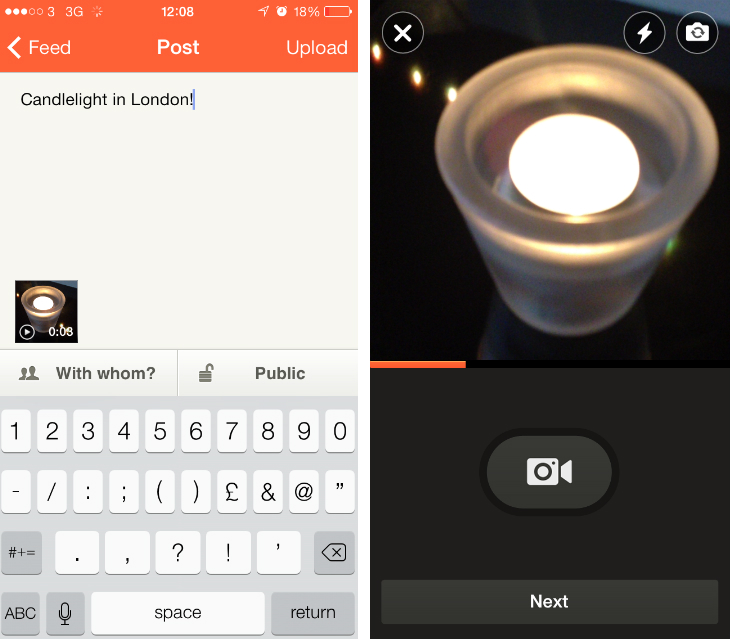
Kakao updated its KakaoStory (its mobile-centric photo-sharing service similar to Instagram) for iOS and Android apps today with a new feature that gives users the ability to capture 15-second videos.
If you’ve used Vine or Instagram videos before, you’ll know exactly what to expect. Just tap and hold the camcorder icon begin a new shot, releasing your finger only when you want to cut to a different angle. KakaoStory will happily suspend your video inbetween shots, which means that you can spend as much time as you want setting up for a new angle provided you keep the app open.
kakaostory KakaoStory for iOS and Android now lets you record and share 15 second videos, just like Instagram
Videos are shot in a square-crop format, and you can alternate between the front and rear-facing cameras using the icon in the top right-hand corner of the screen. You can also tap to focus and toggle the flash on or off at any time. When you’re done, just hit Next, followed by Write. You can then add a caption, set the privacy options and upload it to your profile.
At the moment, KakaoStory is missing many of the advanced editing features found in Vine and Instagram, such as the ability to delete or rearrange recent shots. There’s no reason why Kakao couldn’t patch that in with a future update though.
Disclosure: This article contains an affiliate link. While we only ever write about products we think deserve to be on the pages of our site, The Next Web may earn a small commission if you click through and buy the product in question.